How Much Does a Website Cost in 2026? The Definitive Pricing Guide
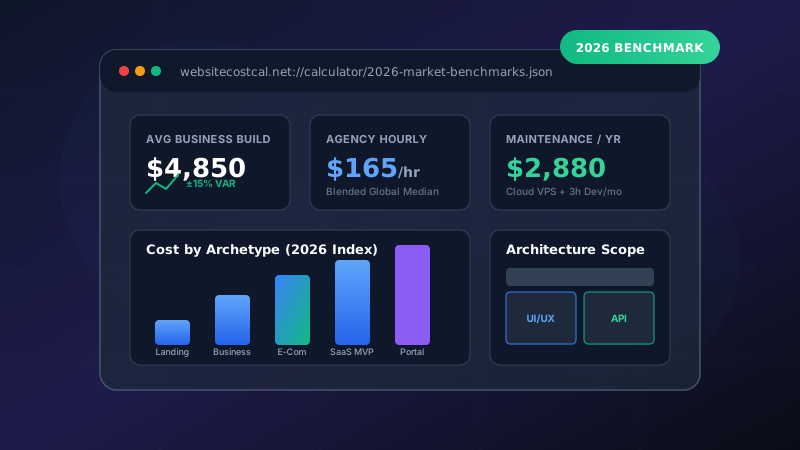
Building a website in 2026 can cost anywhere from $100 to over $100,000. This massive range exists because the word "website" can refer to anything from a single DIY page built on a drag-and-drop website builder to a complex, multi-tenant enterprise portal integrated with proprietary ERPs and bespoke AI engines.
Whether you are a startup founder planning your initial seed-round MVP, a small business owner aiming to generate local inbound leads, or an enterprise marketing director revamping your corporate infrastructure, this comprehensive guide will break down every component of website pricing.
Looking for a custom line-item estimate tailored to your exact tech requirements and page count? Use our free Interactive Website Cost Calculator to receive a live breakdown in seconds.
1. Executive Summary: 2026 Price Ranges at a Glance
Based on our analysis of over 1,400 global web design proposals, freelance contracts, and digital agency rate cards, here is how typical projects break down in 2026:
| Website Archetype | DIY / No-Code | Freelancer (Senior) | Specialized Agency | Avg. Timeline |
|---|---|---|---|---|
| Landing Page / Funnel | $50 – $250 | $600 – $1,800 | $2,500 – $6,000 | 1 – 2 Weeks |
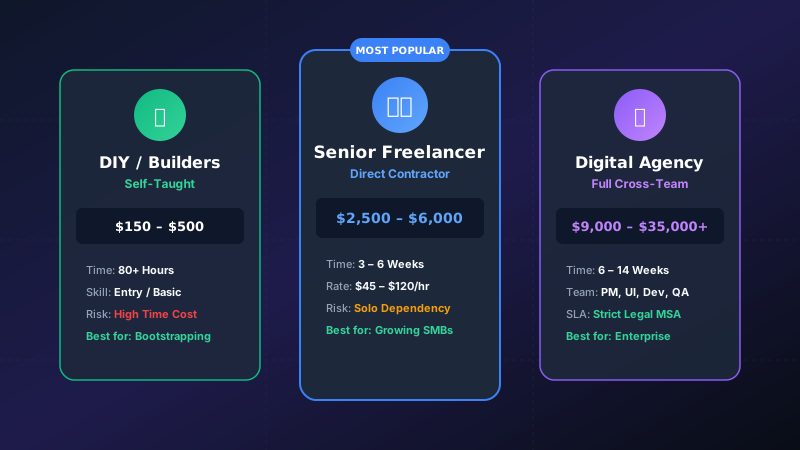
| Small Business (5–12 Pages) | $150 – $600 | $2,000 – $5,000 | $6,000 – $18,000 | 3 – 6 Weeks |
| Mid-Market Corporate (15–40 Pages) | $500 – $1,500 | $4,500 – $10,000 | $15,000 – $45,000 | 6 – 10 Weeks |
| E-Commerce Store (100–1,000 SKUs) | $400 – $1,800 | $4,000 – $12,000 | $18,000 – $60,000 | 8 – 14 Weeks |
| Custom SaaS / Web Application | N/A | $8,000 – $25,000 | $30,000 – $120,000+ | 10 – 24 Weeks |
2. The 5 Core Drivers of Web Development Costs
Why do two companies requesting an "e-commerce site" receive quotes of $4,000 and $40,000? Pricing is determined by five interconnected pillars:
A. User Experience (UX) & UI Design Fidelity
A project utilizing a pre-built commercial theme (like on WordPress or Shopify) skips the user research and wireframing phases. In contrast, custom UI/UX design involves thorough stakeholder interviews, competitive UX audits, Figma wireframing, clickable prototypes, and conversion optimization testing. According to authoritative research by W3C Web Accessibility Guidelines, building accessible, compliant web interfaces requires specialized engineering rigor.
B. Structural Scope & Page Volume
The number of unique templates and individual content pages directly scales developer hours. A 5-page site requires ~40 hours of implementation, while a 40-page corporate hub with case studies, resource centers, and multi-tier service hubs demands 200+ engineering hours.
C. Technology Stack & Content Management System (CMS)
Selecting between an off-the-shelf CMS like WordPress, a hosted solution like Shopify, or a headless modern stack (such as Next.js with Sanity or Strapi) radically shifts upfront setup fees and long-term maintenance costs. For an in-depth technological breakdown, explore our guide on Custom Code vs. WordPress vs. Shopify.
D. Backend Integrations & Custom Features
Standard websites only require lead capture forms and Google Analytics. When you introduce custom CRM two-way syncing (Salesforce, HubSpot), ERP inventory automation, multi-currency gateways, or member authentication, backend engineering hours multiply quickly.
E. Execution Talent Model
Hiring a junior offshore freelancer ($25/hr) yields drastically different cost dynamics and risk profiles compared to a vetted domestic agency ($150–$250/hr) with dedicated project managers and QA testers. Dive deeper into our evaluation of Freelancer vs. Agency vs. DIY.
3. Line-Item Cost Breakdown Across Project Phases
Professional agencies typically bill across structured project milestones:
- Discovery & Strategy (10–15% of total budget): Requirements gathering, technical architecture mapping, competitor keyword analysis, and sitemap hierarchy design.
- UI/UX Design & Prototyping (25–30%): Brand identity styling, high-fidelity wireframing in Figma, interactive design systems, and responsive mobile mockups.
- Frontend & Backend Development (35–45%): Semantic HTML5/CSS3 coding, component architecture, database schemas, CMS integration, and API connection.
- Quality Assurance & Testing (10–15%): Cross-browser testing (Chrome, Safari, Firefox, Edge), mobile responsiveness, Core Web Vitals speed tuning, and security audits.
- Deployment & DNS Handover (5%): SSL certificate configuration, CDN caching setup, 301 redirect mapping, and Google Search Console indexing.
4. Ongoing & Recurring Operating Costs
Launching the website is merely the initial capital expenditure (CapEx). Sustaining a secure, high-ranking web asset requires operational expenditure (OpEx). Refer to Google Search Central Documentation for recommendations on maintaining crawl health and search visibility.
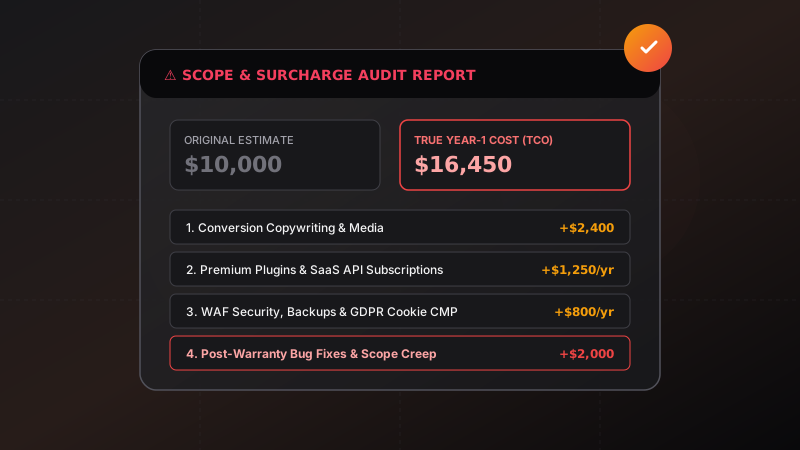
Always allocate 15% to 25% of your initial website build budget for annual maintenance, hosting, security updates, and SaaS plugin licenses. Read our 9 Hidden Costs Guide for a line-item checklist.
- Domain Registration: $12 – $40 per year (.com, .io, .co).
- Managed Cloud Hosting: $15 – $250/month depending on traffic volume and server resources (DigitalOcean, AWS, Vercel, Kinsta).
- SSL Certificates: Free (Let's Encrypt) to $150/year (Extended Validation SSL).
- Premium Plugins & Software Licenses: $100 – $1,200/year (Advanced Custom Fields, WP Rocket, Form builders, CDN services).
- Maintenance Retainers: $85 – $650/month for proactive security patching, database optimizations, and backup monitoring. Learn more in our Monthly Maintenance Retainer Breakdown.
5. How to Create an Accurate Web Development RFP Budget
To avoid budget overruns and scope creep when soliciting bids:
- Write a Clear Functional Specification: Document every feature, user role, and integration required before requesting proposals.
- Establish a Core MVP vs. Phase 2 Wishlist: Prioritize mission-critical revenue-generating pages first.
- Prepare Content Assets Early: Copywriting bottlenecks are the #1 cause of delivery delays and contractor add-on fees.
- Use Benchmarked Cost Tools: Run your scope through our Website Cost Estimator to validate vendor quotes against industry averages.